As your business grows, upgrading your subscription allows you to:
increase message limits
add more AI Agents
invite more teammates
unlock advanced integrations
access additional support features
Open the Billing section
To upgrade your subscription:
Open your workspace
Go to Billing
Review the available plans
Inside this section, you can compare features, limits, and pricing.
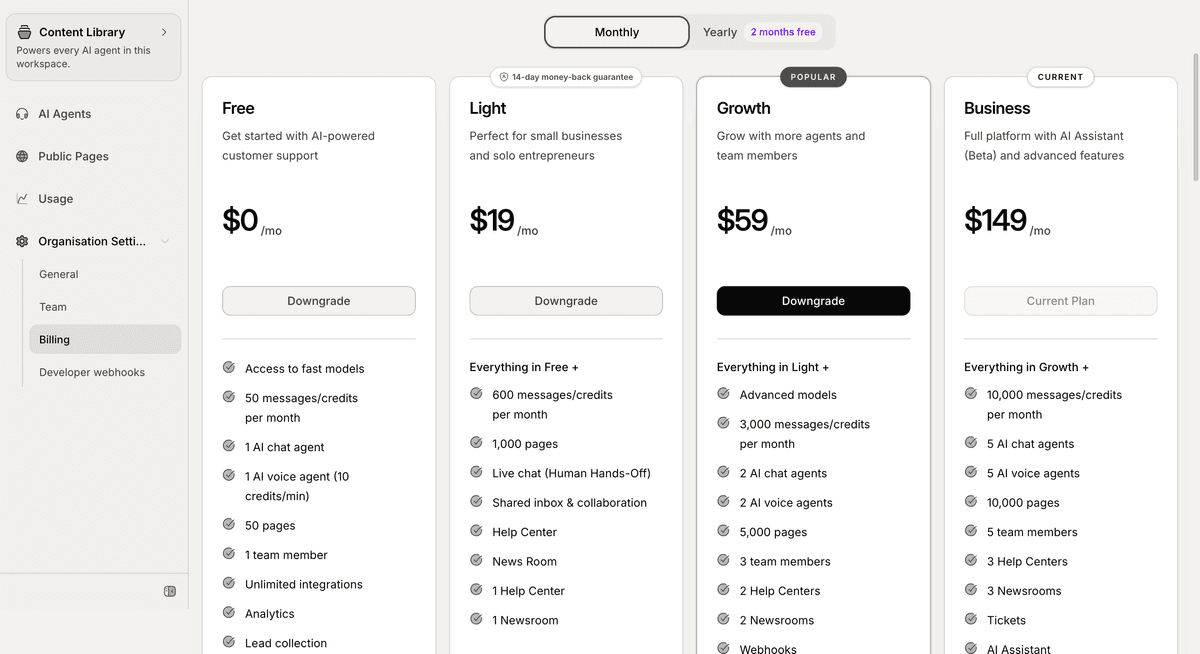
Compare available plans
Each Mando AI plan includes different limits and capabilities.
Depending on the plan, you may receive:
more messages
additional pages
extra AI Agents
more team seats
advanced integrations
Human Handoff features
Choose the plan that best matches your support and operational needs.
Upgrade your workspace
To upgrade:
Select the plan you want
Click Upgrade
Complete the billing process
Your workspace limits and available features will update automatically after the upgrade is completed.
When should you upgrade?
Many businesses upgrade when they:
handle more customer conversations
add more support teammates
create additional AI Agents
need larger content limits
require advanced integrations
Growing ecommerce stores and support teams usually scale usage over time.
Review your current usage
Before upgrading, review your workspace usage.
Common usage metrics include:
messages
pages
AI Agents
team members
This helps you choose the right subscription plan based on your actual needs.
Access advanced features
Some features are only available on higher plans.
Examples may include:
Human Handoff
advanced AI models
MCP integrations
webhooks
If a feature is unavailable, review your current plan inside the Billing section.
Manage your subscription later
You can later:
change plans
review billing information
monitor workspace usage
This allows your workspace to scale as your business grows.
PRO TIP:
Monitor your workspace usage regularly during the first few weeks after deployment. This helps you estimate the right plan before your support volume increases.