Ticket statuses help teams track:
unresolved issues
active support requests
pending follow-ups
completed conversations
Clear statuses improve visibility across both AI and human support workflows.
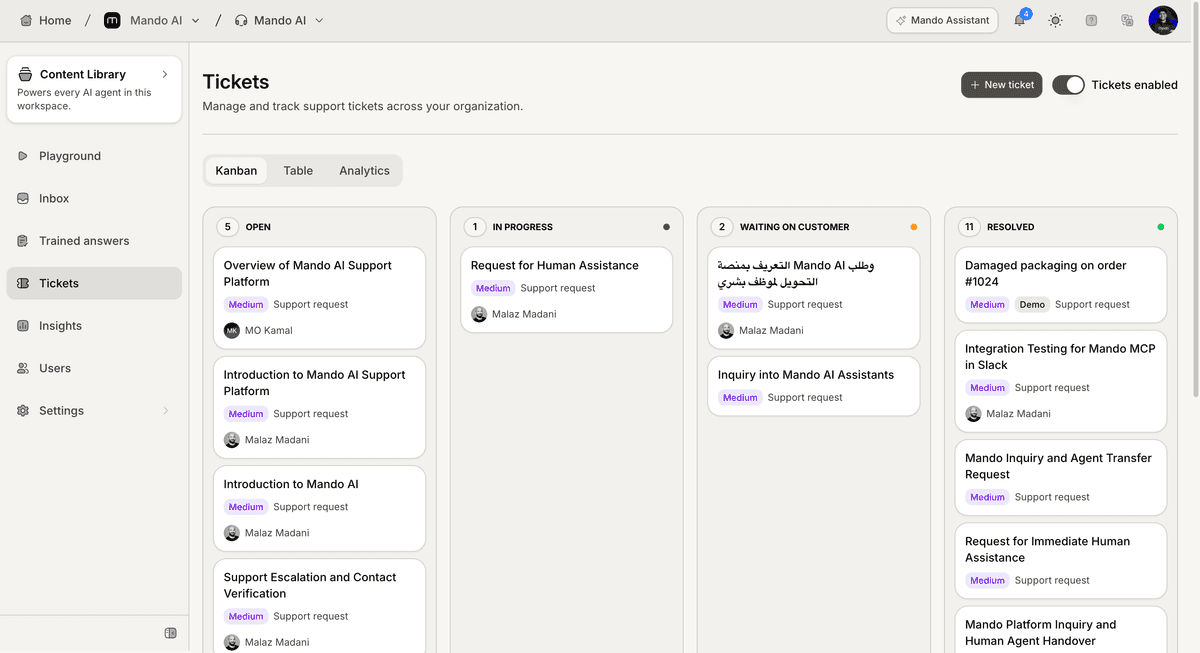
Open the Tickets section
To manage ticket statuses:
Open your AI Agent workspace
Go to Tickets
Inside the Tickets section, statuses are used across both:
Kanban View
Table View
Understand ticket statuses
Statuses help define the current stage of a support request.
Common statuses may include:
Open
In Progress
Pending
Resolved
Each status represents a different stage in the customer support workflow.
Open status
The Open status is commonly used for:
new customer requests
unreviewed conversations
newly created tickets
These tickets usually require initial review or assignment.
In Progress status
The In Progress status is used when:
a teammate is actively working on the issue
support investigation is ongoing
the customer is currently being assisted
This helps teams identify active workflows quickly.
Pending status
The Pending status is commonly used when:
waiting for customer replies
waiting for internal review
external action is required
Pending tickets help teams track unresolved workflows without closing the issue.
Resolved status
The Resolved status is used for completed support requests.
This usually means:
the issue was solved
the customer request was completed
no additional action is currently needed
Resolved tickets help maintain organized support history.
Update ticket statuses
To update a ticket status:
Open the ticket
Select the status field
Choose the new status
Save your changes
In Kanban view, tickets may also be moved between columns directly.

Use statuses consistently
Consistent status usage helps:
improve workflow visibility
organize support operations
reduce confusion
improve reporting accuracy
This becomes especially important as support volume grows.
Combine statuses with priorities and assignments
Statuses work best when combined with:
ticket priorities
assignees
categories
Human Handoff workflows
Together, these systems create a more organized support operation.
Best practices for ticket statuses
For cleaner support workflows:
avoid leaving tickets without statuses
update statuses regularly
resolve outdated tickets
define clear team workflows
Well-maintained ticket workflows usually improve operational efficiency significantly.
PRO TIP:
Keep your status system simple. Smaller and clearer workflows are usually easier for teams to maintain consistently.