Two tabs. Same conversations underneath. Different jobs.
If you've ever flipped between "this needs a reply in the next 30 seconds" and "we need to circle back on this next week," that's the split. The Inbox handles the first kind. Tickets handle the second.
Here's the rule of thumb most teams settle into.
Leave it in the Inbox when:
A customer just messaged and you're replying now (or in the next hour)
The whole thing wraps up in one sitting
It's a quick question: refund check, "did my order ship," "where's the link"
Convert it to a Ticket when:
You need to come back to it tomorrow, next week, or after engineering ships a fix
It needs a specific owner — not just whoever's online
Multiple agents are about to touch it
You need to leave internal notes that the customer must absolutely not see
That's the whole framework. No gospel. Some teams convert almost everything. Some teams convert almost nothing. Both work.
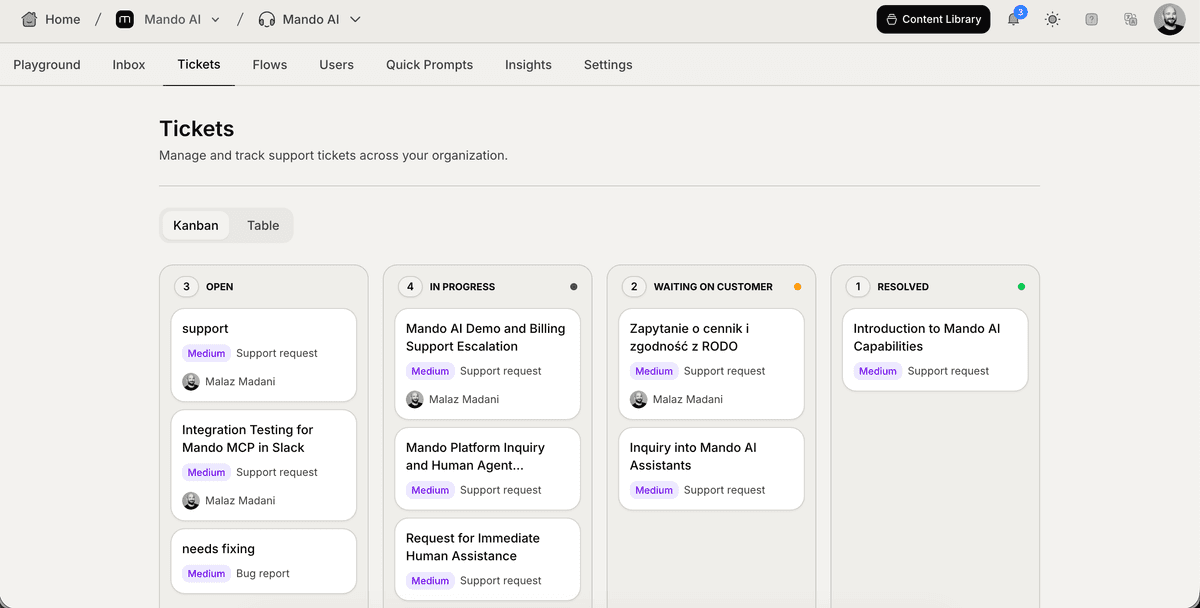
"Wait, where does the customer see the ticket?"
They don't. They never had a view of one.
This trips up everyone on day one, so let's be plain about it: the customer doesn't know what a ticket is. They don't see a status, a priority, a category, or a Kanban column. They see the same chat window they were already using. The conversation continues exactly where it left off.
"Ticket" is a word for your team. Not theirs.
This is on purpose. The moment a customer reads "Your ticket has been moved to Resolved," three things happen, and none of them are good. They wonder which column it was in before. They Google their ticket number. They start writing a Trustpilot review with the word "ticket" in it. Keep the language internal.
What converting actually does
When you convert a chat to a ticket, four things happen:
The chat keeps going. Same thread, same history, same person on the other end.
The ticket inherits everything: the customer record, the message history, any tags.
On top of all that, you get the ticket layer — status, priority, category, assignee, snooze, internal notes (yellow background, team only), SLA timers, an AI-generated title and summary.
The chat shows up under both tabs. It's not moved. It's both.
That last point catches people. Converting doesn't pull the chat out of the Inbox. The Inbox tab is still where live triage happens. The Tickets tab is where you go when you need the management layer on top.
When converting is overkill
A few cases where the ticket layer adds work and adds nothing back:
The conversation is already done. Mark it resolved in the Inbox.
It's a one-shot question with a one-shot answer ("Do you ship to Lebanon?").
It's spam, or a clear misfire. Just close it.
You forgot to reply yesterday and want the delay to look intentional. We've all been there. Try snoozing instead — same effect, less paperwork.
Don't ticket every conversation. The Tickets tab should reflect real in-progress work, not your guilty conscience.
When NOT converting will hurt you
The customer hit a real bug. You'll be back in three days when engineering ships the fix.
You promised "I'll get back to you Tuesday." Anything that crosses a day boundary needs an owner and a timer.
Multiple agents are about to touch it. Inbox handoffs are vibes-based. Tickets have an assignee.
A refund, an account merge, or any "I'll need to escalate this" moment. Don't trust your inbox memory.
A short field guide
Situation | Where it lives |
New chat just landed | Inbox |
One-line question, one-line answer | Inbox |
Customer might reply tomorrow | Inbox if low-effort, Ticket if you need to track it |
Bug, escalation, blocked on someone else | Ticket |
Same customer, fifth message about the same problem | Ticket. Yesterday. |
You snoozed it for next week | Ticket, so auto-unsnooze can wake it up cleanly |
One thing to know up front
Customer-type tickets need an email channel set up on your app. The reason is simple: tickets often run for days, and the chat widget closes the second the customer shuts their browser tab. After that, email is the only way to actually reach them.
If your app doesn't have email connected yet and you try to convert a chat into a customer-type ticket, Mando shows a soft warning with a link to setup. You can still proceed — but your replies won't get through until the customer comes back to the widget on their own. Setting up email is a one-time job. It's worth doing before you start converting.
What's next
Once you've decided to convert, the next article walks through how — and what's worth setting on the way in. Spoiler: the defaults are fine for almost everything.