Developer webhooks allow you to send Mando events to your own external systems and services.
Open Developer webhooks
To create a webhook endpoint:
Open Organization Settings
Open Developer webhooks
Stay on the Endpoints tab
Click Add Endpoint
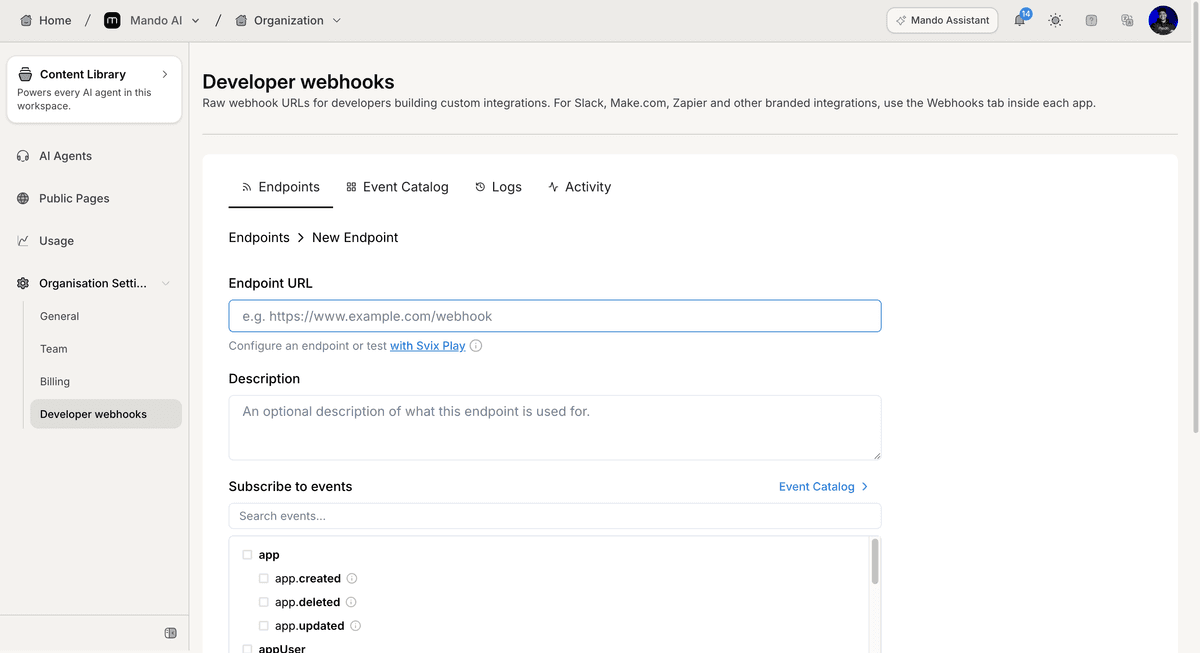
This opens the endpoint configuration page.
Configure the endpoint details
To configure your endpoint:
Enter the Endpoint URL
Add a Description if needed
The description field is optional.
Subscribe to events
Choose which events should trigger the webhook:
Locate Subscribe to events
Search for an event if needed
Select the event categories or individual events
Events can be selected from the available event list.
Configure additional settings
The endpoint page also includes additional configuration options.
Available settings include:
Enable endpoint throttling
Custom headers configuration
Custom headers can be configured after the endpoint is created.
Create the endpoint
After reviewing your configuration:
Click Create
Your webhook endpoint will be added to the endpoint list.
PRO TIP:
Subscribe only to the events you need to avoid sending unnecessary webhook traffic.