Uploading files allows your AI Agent to answer questions using information stored in documents, guides, presentations, spreadsheets, and other business files.
This is useful for:
product documentation
onboarding guides
internal processes
FAQs
policies
support documentation

Open the file upload flow
To upload files:
Open your AI Agent workspace
Go to the Playground
Open the Train step
Click Upload Files
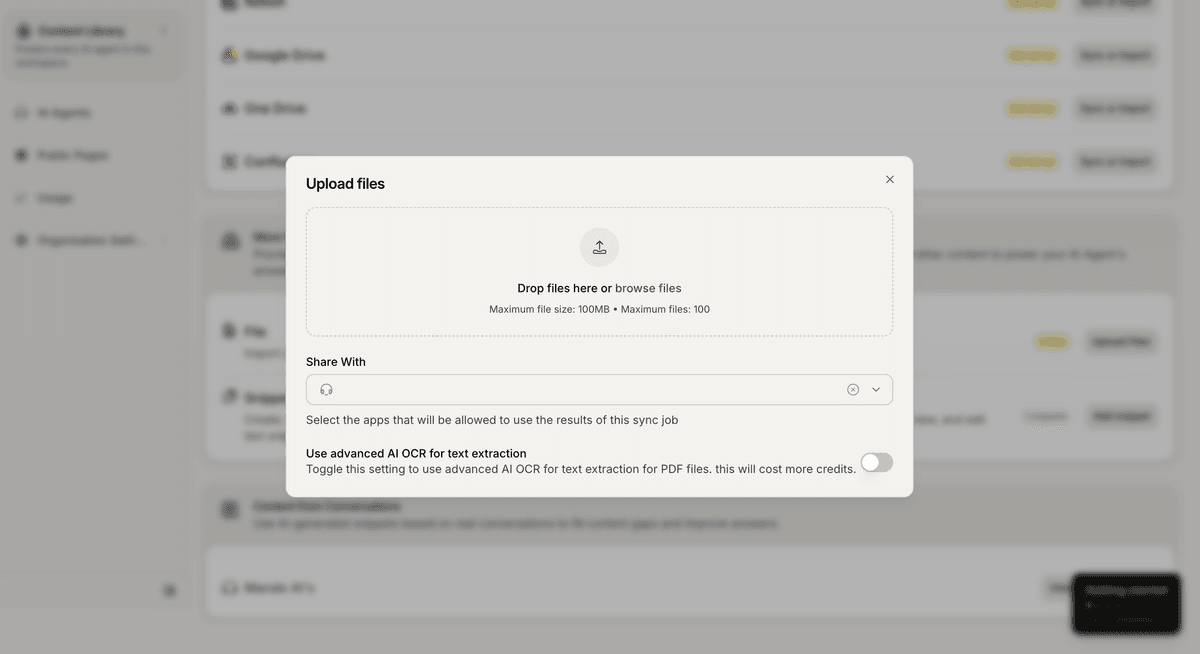
This opens the file upload modal.
Upload your files
Inside the upload modal:
Drag and drop your files
Or click Browse files
Select which apps can access the content
Click Upload
Mando AI will automatically process and index the uploaded content.
Supported file types
Mando AI supports multiple file formats, including:
PDF
DOCX
TXT
MD
XLSX
PPTX
HTML
This allows you to train your AI using both structured and unstructured business content.
File upload limits
Current upload limits include:
Maximum file size: 100MB
Maximum files per upload: 100
Large uploads may take longer to process depending on file size and complexity.
Use AI OCR for PDFs
Mando AI includes optional AI OCR processing for PDFs.
Enable AI OCR if:
your PDF contains scanned pages
text is not selectable
the document is image-based
AI OCR improves text extraction accuracy for difficult PDFs.
Keep in mind that OCR processing may consume more credits.
Share uploaded content with AI Agents
Inside the Share With section, choose which apps can access the uploaded files.
This allows multiple AI Agents to reuse the same content.
For example:
a Customer Support AI Agent
an internal assistant
a Sales AI Agent
can all access the same uploaded documents.
Best practices for uploaded files
For better AI responses:
upload clean and readable documents
avoid duplicate files
use structured formatting when possible
keep content updated
Good file examples include:
shipping policies
onboarding manuals
product catalogs
troubleshooting guides
PRO TIP:
Well-structured documents with clear headings and sections usually produce more accurate AI answers.