When connecting a website, Mando AI can process your content using different crawling modes depending on how your website is built.
Choosing the correct mode helps improve indexing accuracy and AI answer quality.
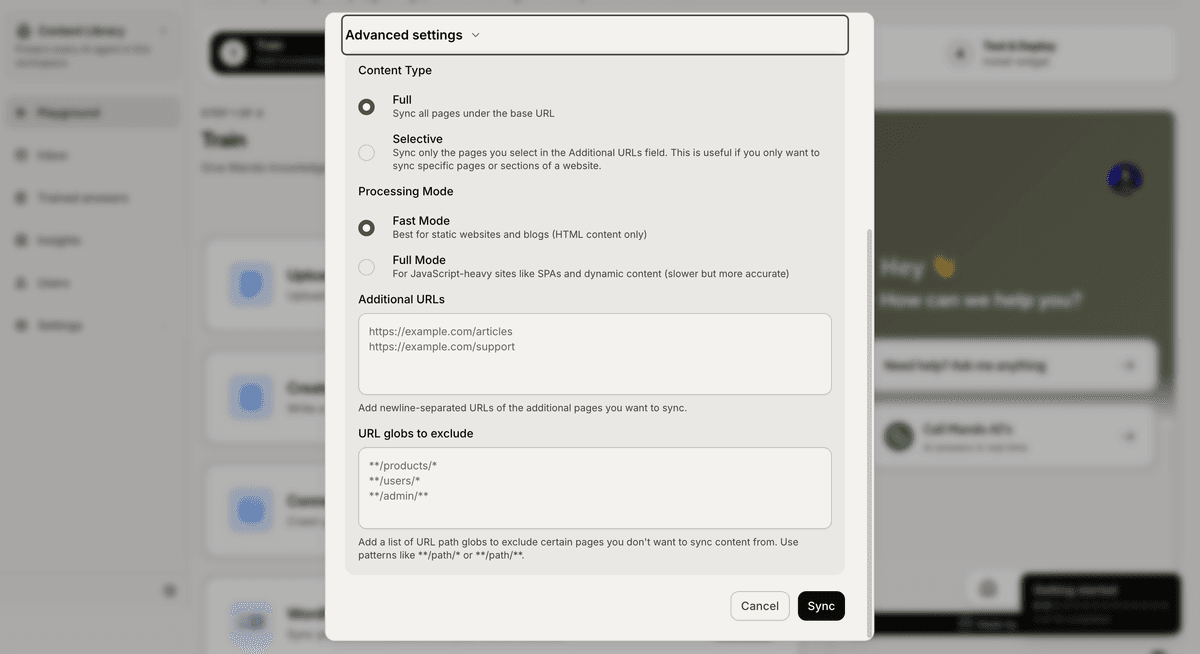
What is Fast Mode?
Fast Mode is optimized for:
static websites
blogs
documentation sites
standard HTML pages
This mode processes websites quickly and works well for most websites.
Fast Mode is usually the best choice for:
help centers
marketing websites
landing pages
traditional ecommerce stores
Benefits of Fast Mode
Fast Mode offers:
faster syncing
quicker indexing
lower processing time
faster content updates
For many businesses, Fast Mode is all you need.
What is Full Mode?
Full Mode is designed for websites that rely heavily on JavaScript and dynamic rendering.
This mode uses a more advanced crawling process to capture content that may not appear immediately in the page source.
Full Mode is recommended for:
dynamic ecommerce storefronts
SPAs (Single Page Applications)
React-based websites
JavaScript-heavy pages
Benefits of Full Mode
Full Mode can:
capture dynamically loaded content
improve indexing accuracy
detect delayed page content
process modern frontend frameworks more effectively
This helps your AI Agent generate more accurate answers from dynamic websites.
When should you use Fast Mode?
Use Fast Mode if:
your website content loads normally
pages are mostly text-based
content is publicly visible immediately
you want faster sync times
Most documentation websites work perfectly with Fast Mode.
When should you use Full Mode?
Use Full Mode if:
important content loads after the page opens
Fast Mode misses information
your website uses heavy frontend rendering
content appears dynamically
If your AI Agent is missing website content, switching to Full Mode may help.
Can you change the mode later?
Yes.
You can:
Reopen the website settings
Change the processing mode
Re-sync your website
This allows you to test different modes and compare results.
PRO TIP:
Start with Fast Mode first. If important content is missing after syncing, switch to Full Mode and run a new sync.