The WooCommerce integration allows Mando AI to access your products, pages, and store content so your AI Agents can provide better ecommerce support.
This is useful for:
product questions
order support
shipping information
return policies
ecommerce automation

Before you begin
To connect WooCommerce, you need:
a WordPress website
WooCommerce installed
access to your WordPress admin dashboard
You will also need to install the Mando CX plugin.
Open the WooCommerce connection flow
To connect WooCommerce:
Open your AI Agent workspace
Go to the Playground
Open the Train step
Click WordPress / WooCommerce
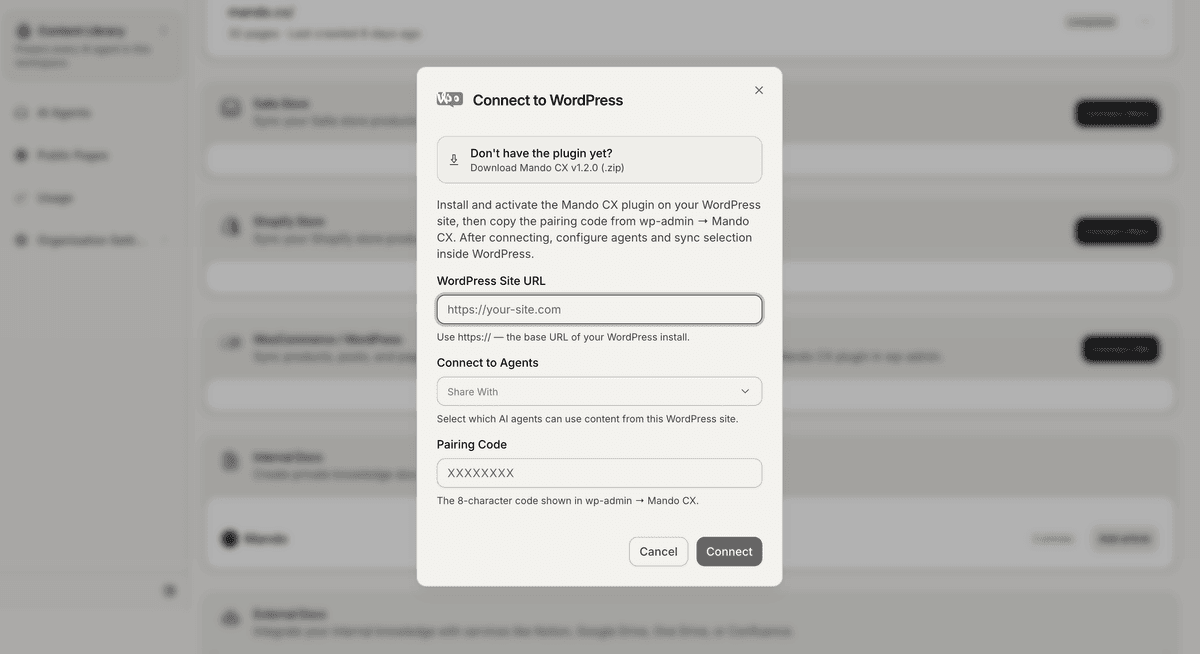
This opens the WooCommerce connection form.
Download the Mando CX plugin
Inside the connection flow:
Click Download Mando CX
Save the plugin ZIP file to your computer
You will install this plugin inside WordPress.
Install the plugin in WordPress
Inside your WordPress admin dashboard:
Open Plugins
Click Add Plugin
Click Upload Plugin
Select the Mando CX ZIP file
Click Install Now
Activate the plugin
After activation, the plugin will generate a pairing code.
Connect your website
Return to Mando AI and complete the connection:
Enter your WordPress website URL
Paste the pairing code from WordPress
Select which apps can access the content
Click Connect
Mando AI will begin syncing your WooCommerce content automatically.
What content can WooCommerce sync?
WooCommerce integrations can sync:
products
pages
posts
ecommerce content
This helps AI Agents answer customer questions using your actual store information.
Examples:
“What sizes are available?”
“Do you offer express shipping?”
“How long does delivery take?”
“What is your return policy?”
Share WooCommerce content with AI Agents
Inside the Share With section, choose which apps can access the synced content.
This allows multiple AI Agents to reuse the same ecommerce knowledge.
For example:
a Customer Support AI Agent
a Sales AI Agent
an internal support assistant
can all use the same synced content.
Improve WooCommerce AI responses
For better AI performance:
keep product descriptions updated
organize categories clearly
maintain updated shipping policies
remove outdated product pages
Well-structured ecommerce content usually improves answer quality significantly.
Manage the integration later
After connecting WooCommerce, you can:
re-sync content
update permissions
connect additional AI Agents
combine WooCommerce data with websites, snippets, and uploaded files
This helps centralize your support knowledge inside one workspace.
PRO TIP:
Combine WooCommerce syncing with website crawling for the best results. This helps your AI Agent learn from both product data and support documentation.