Snippets are lightweight content blocks designed for fast and focused AI answers. They are useful for information that does not require a full article.
Common use cases include:
short FAQs
shipping information
refund policies
support replies
pricing explanations
reusable instructions

Open the snippet editor
To create a snippet:
Open Content Library
Go to the Sources tab
Find the Snippets section
Click Add snippet
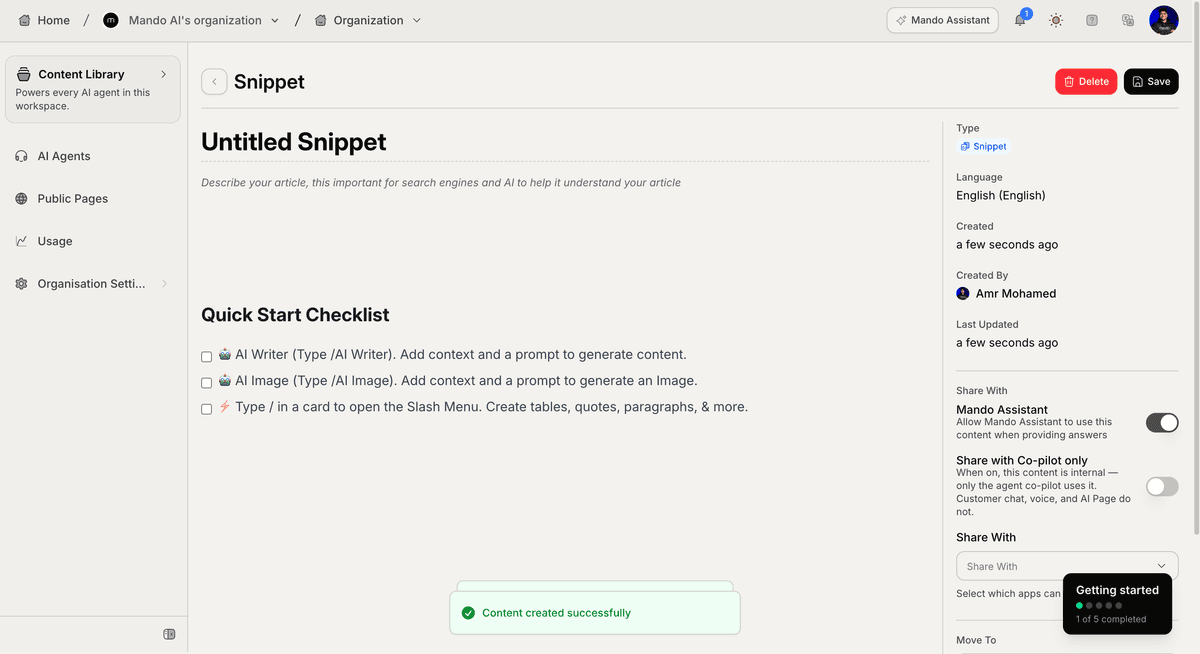
This opens the snippet editor.
Add your snippet content
Inside the editor:
Add a title
Write the snippet content
Choose which apps can access it
Save the snippet
Your AI Agents can immediately start using the snippet after it is saved.
When should you use snippets?
Snippets work best for:
short answers
reusable information
quick support replies
small knowledge updates
Examples:
shipping timelines
return instructions
business hours
payment methods
delivery information
If the content is longer or requires multiple sections, an internal article is usually a better choice.
Share snippets with AI Agents
Inside the snippet settings, choose which apps can access the content.
You can:
share snippets with multiple AI Agents
make snippets available across different workflows
reuse the same information across your workspace
This allows the same knowledge to be reused consistently.
Organize snippets
As your workspace grows, snippets can help centralize repeated information that customers ask about frequently.
For example:
ecommerce stores can create snippets for shipping and returns
SaaS companies can create snippets for onboarding and pricing
support teams can create snippets for repetitive support answers
This helps your AI Agent respond faster and more consistently.
Snippets vs internal articles
Use snippets for:
short information
direct answers
reusable responses
Use internal articles for:
detailed documentation
tutorials
workflows
multi-section content
Both can work together inside the same AI knowledge base.
PRO TIP:
Snippets are ideal for frequently repeated customer questions that need short and consistent answers.