When you connect a website, Mando AI crawls and indexes your pages so your AI Agent can answer questions using your documentation, policies, products, and support content.
This works well for:
documentation websites
ecommerce stores
help centers
marketing websites
blogs
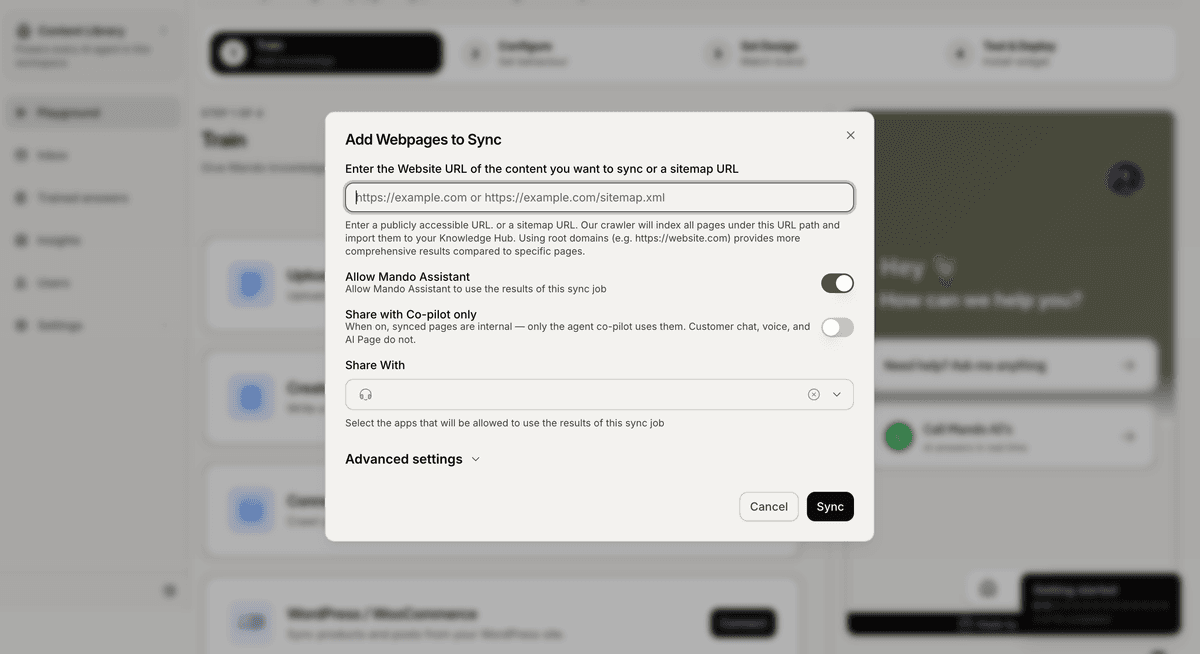
Open the website connection flow
To connect a website:
Open Content Library
Stay inside the Sources tab
Find the Websites section
Click Add Website
This opens the website sync modal.
Add your website URL
Inside the sync modal:
Enter your website URL or sitemap URL
Choose which apps can access the content
Configure optional settings if needed
Click Sync
You can use:
a standard website URL
a sitemap URL
Examples:
https://yourwebsite.comhttps://yourwebsite.com/sitemap.xml
Share content with your AI Agents
Inside the Share With section, choose which apps can access the synced content.
This allows multiple AI Agents to reuse the same knowledge source.
For example:
a Customer Support AI Agent
a Sales AI Agent
an internal assistant
can all access the same website content.
Choose a processing mode
Mando AI supports two processing modes:
Fast Mode
Best for:
static websites
blogs
documentation websites
Full Mode
Best for:
dynamic websites
JavaScript-heavy websites
modern frontend frameworks
If important content is missing after syncing, try switching to Full Mode.
Sync selected pages only
If you only want to sync specific pages:
Change the Content Type to Selective
Add the URLs you want to include
Start the sync
This is useful when you only want your AI Agent to learn from specific documentation or support pages.
Exclude pages from syncing
You can prevent specific pages from being indexed using URL exclusion patterns.
Inside URL globs to exclude, add patterns such as:
/products/*
/checkout/*
/admin/*
This helps keep private or unnecessary pages out of your AI knowledge.
Monitor sync progress
After starting the sync, Mando AI begins crawling and indexing your website automatically.
Inside the Websites section, you can monitor:
sync status
indexed pages
last crawl time
You can also re-sync your website later if your content changes.
PRO TIP:
Start by syncing your most important support and informational pages first. Well-structured content usually leads to more accurate AI responses.